Distributed by:
WebGate USA.
465 Halstead St., Suite #110
Pasadena, CA 91107, USA
Tel: 1-626-351-6500
Fax: 1-626-351-3660
WebGate Inc.
4F, Pika Bldg., 894-20,Hokye
2-dong, Dongan-gu, Anyang-si,
Kyunggi-do, Korea (431-836)
Tel: 82-31-455-3555
Fax: 82-31-455-3955
Sales@we/jointfilesconvert/417248/bgateinc.com
Http://www.webgateinc.com
Configurations
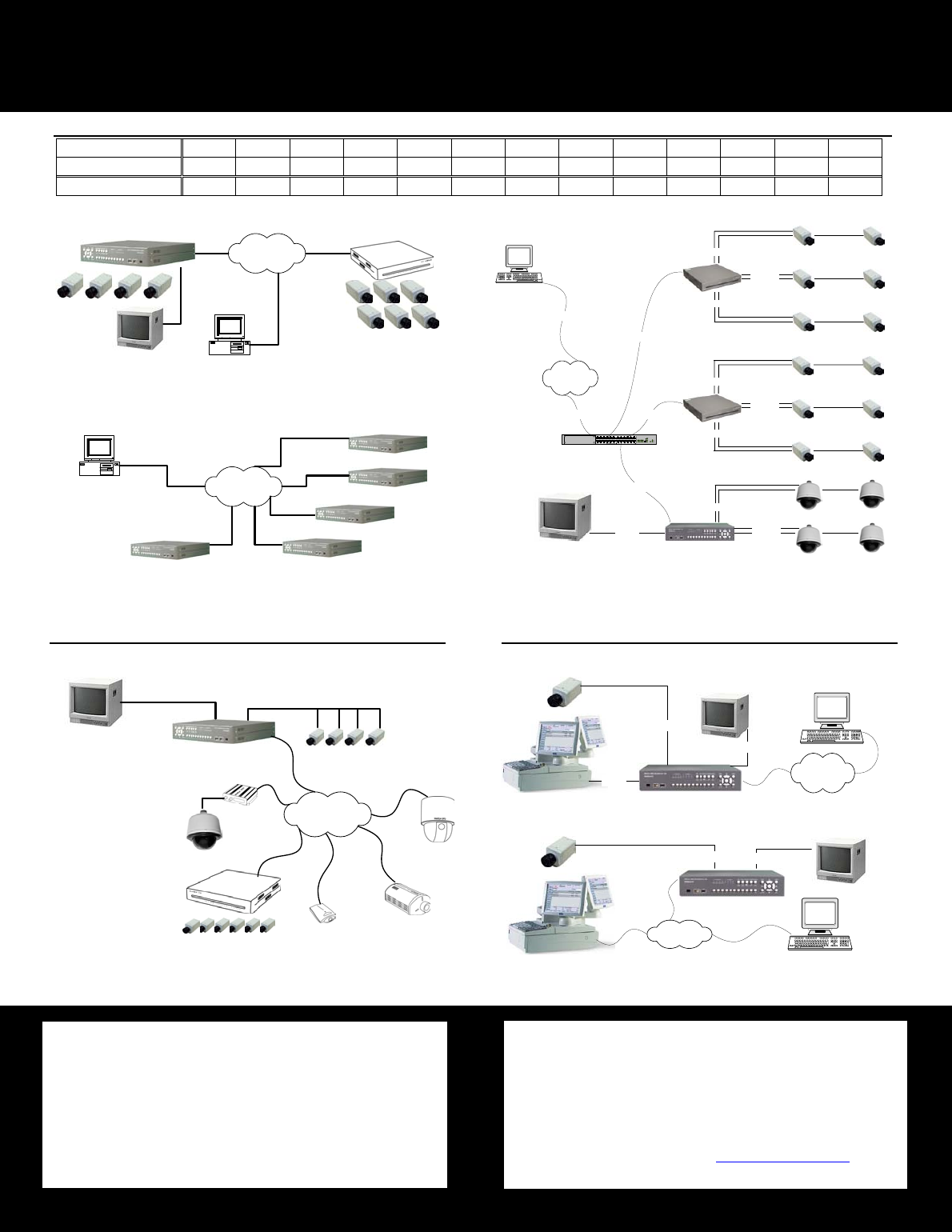
“Recording Server Solution”
► 10Ch Configuration
DVR Manager
Internet
LAN
CCTV Monitor
WebEye B106
► Multi eDVR Monitoring with a PC (Max. 16 eDVR with a DVrManager)
DVR Manager
Internet
LAN
. . . . . . .
► 16Ch Configuration
CCTV Monitor
Coaxial
Internet
LAN
Network
Network
Network
HUB
7Fl.
6Fl.
2Fl.
1Fl.
8Fl.
Network
Coaxial
Coaxial
Coaxial
eDVR (DS412)
DVrManager
Network
Coaxial
Coaxial
B106
4Fl.
3Fl.
5Fl.
Coaxial
Coaxial
Coaxial
B106
System Configuration for 4 Local Channels and External Network Channels (From 4Channel System to 16Channel System)
Analog Video Inputs
4 4 4 4 4 4 4 4 4 4 4 4 4
IP Video Inputs
0 1 2 3 4 5 6 7 8 9 10 11 12
Total Channel 4 5 6 7 8 9 10 11 12 13 14 15 16
System Configuration with POS
Connecting POS with DS412 via serial cable (RS232)
Coaxial
RS232
Internet
LAN
DVR Manager
Coaxial
CCTV Monitor
Connecting POS with DS412 over Network (LAN)
LAN
DVR Manager
CCTV
Monitor
Coaxial
Coaxial
Monitoring IP video through CCTV monitor from remote place
CCTV Monitor
(16Ch Mode)
WebEye B106
Internet
LAN
WebEye E104
WebEye E10
WebEye
SPD
WebEye
B101
Analog Dome
eDVR
* i-Rec is compatible with eDVR, but only live video monitoring is available
* DS412 will work with WebEye products that have a static IP address for now. (Dynamic IP support coming soon)
** For the network video channel, any combination is possible.
System Configuration for IP video monitoring with CCTV Monitor
Comments to this Manuals